Trips History Redesign
Re-structuring a complex operational history system to improve trip lookup and investigation workflows.

Overview
I led the redesign of the Trips History experience to restructure how trip data is organized, surfaced, and explored, streamlining fleet activity monitoring for 250K+ users and driving a highly debated, complex feature to a successful Q1 2026 Beta launch.
Role
Lead Product Designer
Timeline
Q4 2024 - Q1 2026
Team
PM, Engineers, Product Designer (me)
Context
Trips History is a critical operational surface in our fleet management platform, enabling users to review past trips, investigate incidents, and retrieve operational records. Over time, the experience accumulated increasing complexity as new data and features were added. This made it difficult for users to efficiently locate and investigate trips.
Why do we need a redesign?
Trips History was one of the core features of our customer-facing fleet management platform, but the current usability was rated one of the worst among all features in the product, with only a 58% score from our UMUX survey. This was a risk for us as low customer satisfaction will lead to lost of trust, competitiveness over our competitors, and revenue retention.
Feedback from customer interviews also showed why they're frustrated with the experience:
"I know the data exists, but it's so confusing. Finding a past trip or viewing the details takes way more effort than it should."
— Fleet Manager
Problem Framing
Combining customer feedback from interviews and surveys, as well as findings from internal dogfooding and heuristic evaluation, we verified multiple usability issues with the legacy experience:
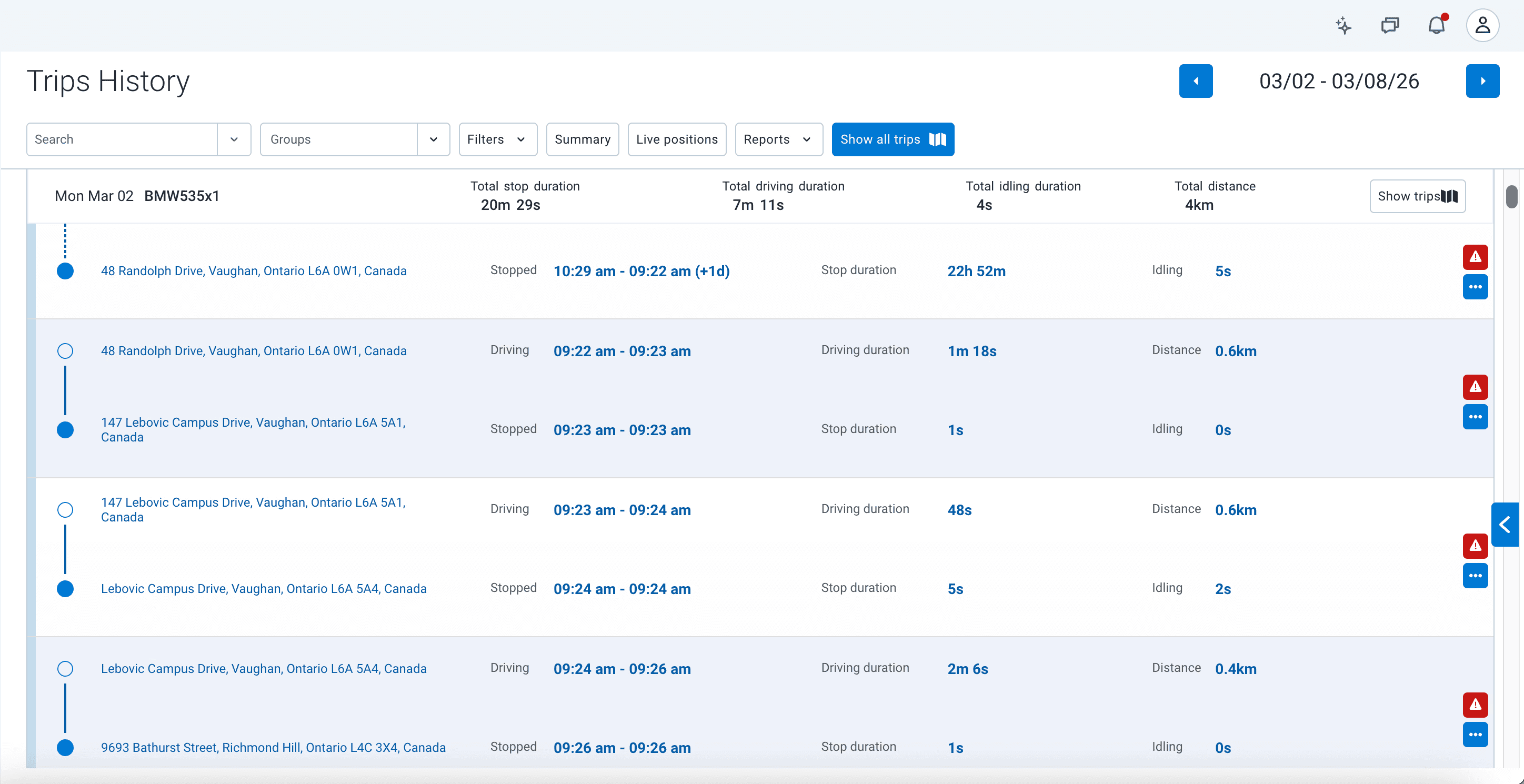
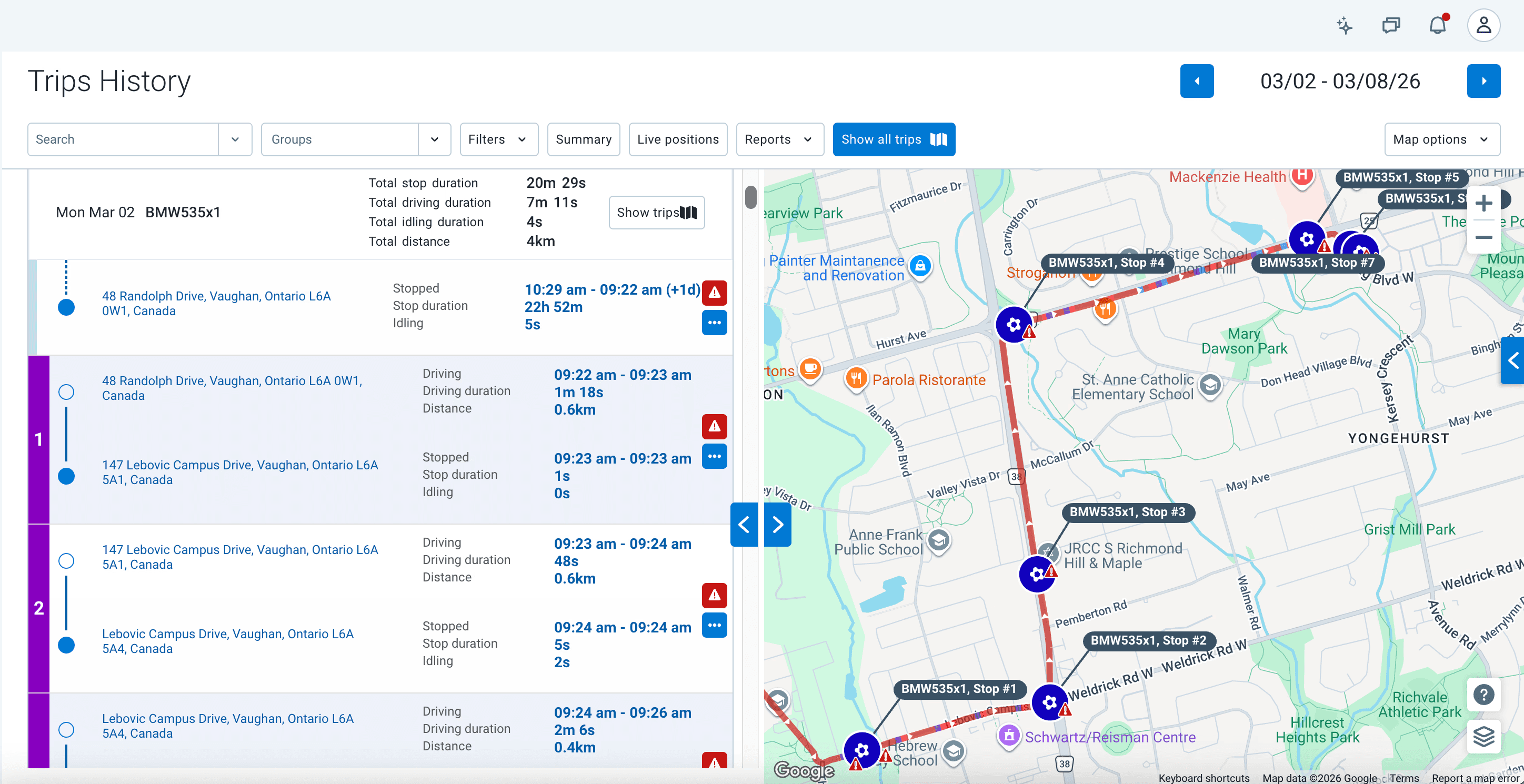
Ambiguous hierarchy
It is difficult to immediately grasp the parent-child relationship of the data. The asset name in the header is somewhat lost above the list rows. It takes a moment to realize that all the subsequent rows are stops and drives belonging to that specific vehicle on that specific day.
Low scannability
The data table forced users to scan horizontally across multiple columns to piece together a single trip's story.
Trip numbers on the map don't map back to the list
The map shows "Stop 1," "Stop 2" … "Stop 7," but the list sidebar groups rows under numbered trip segments (1, 2…). The numbering schemes are different, forcing users to mentally cross-reference both panels simultaneously.
Why do these problems matter?
High cognitive load
An increased cognitive load when parsing each row will make it slower to identify important signals (such as long stops), cause frequent misinterpretations, and reduce efficiency in time-sensitive workflows.
Fragmented mental model
The two panels each tell a different version of the same story, so the user is never able to form one coherent picture of the trip in their head. This uncertainty would degrade the decision quality, causing inaccurate conclusions drawn with an unclear picture of the full trip.
Initial Direction
To solve the problems, I proposed to apply progressive disclosure to show a summary of each trip at a high level, and reveal additional information when the user chooses to. Hiding some information would reduce clutter and decrease the cognitive load. I also proposed a radical shift in the information architecture: moving from a flat, horizontal data dump to a chronological, card-based timeline:
The Collapsed State: Macro Summary (Glanceable Insights)
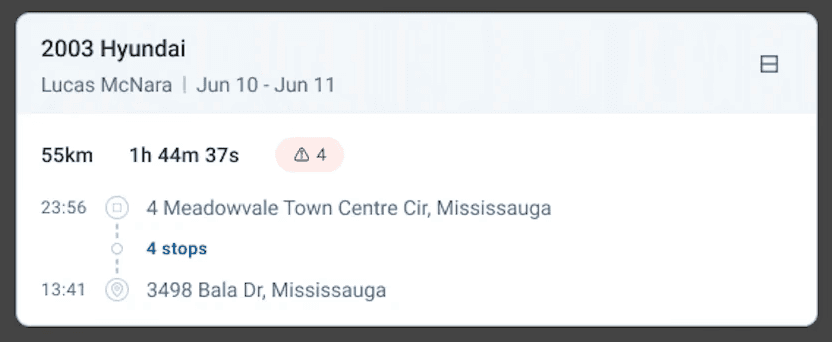
Trip card - collapsed view
Instead of overwhelming the user immediately, the collapsed card acts as an executive summary, where I surfaced only the most critical identifiers to scan a trip quickly:
Vehicle, Driver, Date
High-level metrics: total distance, duration
Safety Alerts count
A minimized route preview with start & end locations → provides geographical context without map clutter
This collapsed view supports quick recognition of a trip and directly addresses the problem of unclear information hierarchy.
The Expanded State: Micro Details (Chronological Timeline)
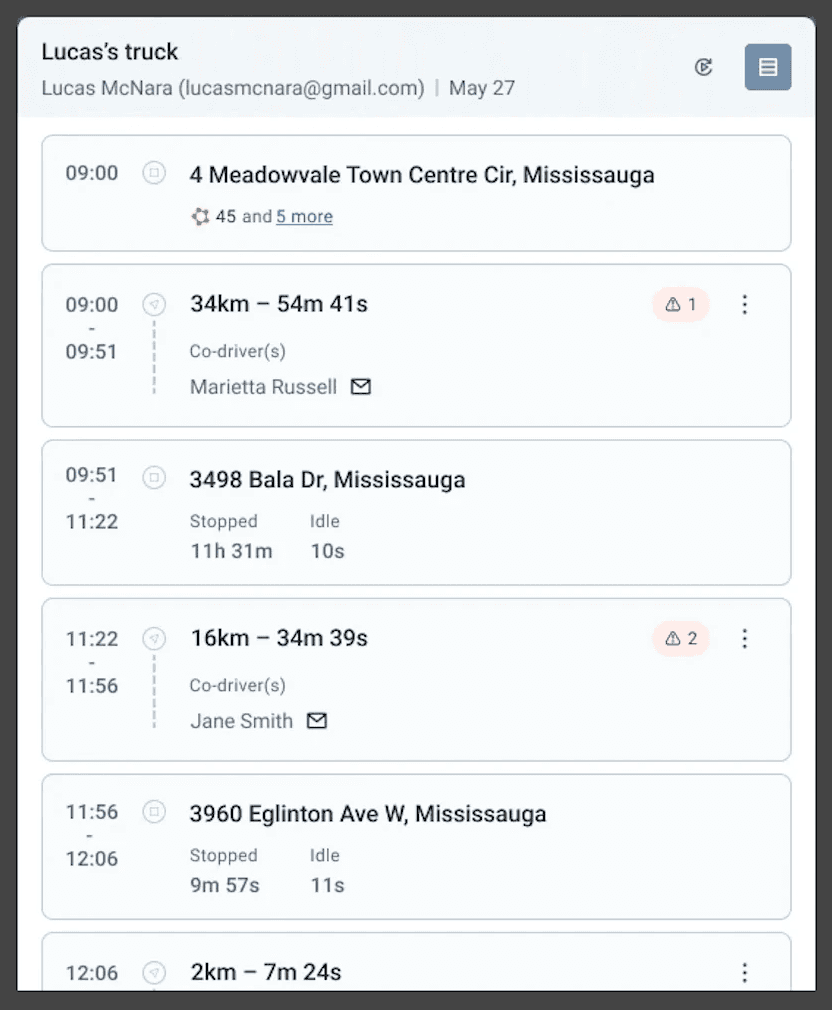
Trip card - expanded view
The logical mental model of a trip should be related to time and sequence: starting from Point A, drove to Point B. With this in mind, I transformed the clunky table of disconnected records into a vertical chronological timeline, and decoupled "Driving" segments from "Stopped" segments into distinct blocks. This allowed me to group relevant data contextually: driving blocks show distance, duration, co-drivers, and in-transit alerts; stopped blocks show location addresses, stop duration and idling time. This structure eliminated the awkward horizontal blank spaces of the legacy design and created a natural, top-to-bottom reading flow.
This directly solves the fragmented mental model by having a unified trip narrative, and high cognitive load by reducing the need to mentally reconstruct sequences.
A key shift in this design is where the details live, by applying progress disclosure: critical information stay in the collapsed view, and all additional details are revealed when expanding the card. Users can verify, scan, and investigate without losing context.
Solution Validation & Strategic Pivot
Through solution validation with internal stakeholders and external users, the initial card-based timeline was able to successfully solve the cognitive load issue for viewing a single trip, and a huge step forward in improving the usability.

But…
Early validation with customers and stakeholders also revealed a critical business constraint, and deeper, hidden complexities.
Customer feedback
Besides the positive feedback comparing to the legacy version, there were 5 top issues raised from customer interviews, captured and summarized in our NotebookLM:
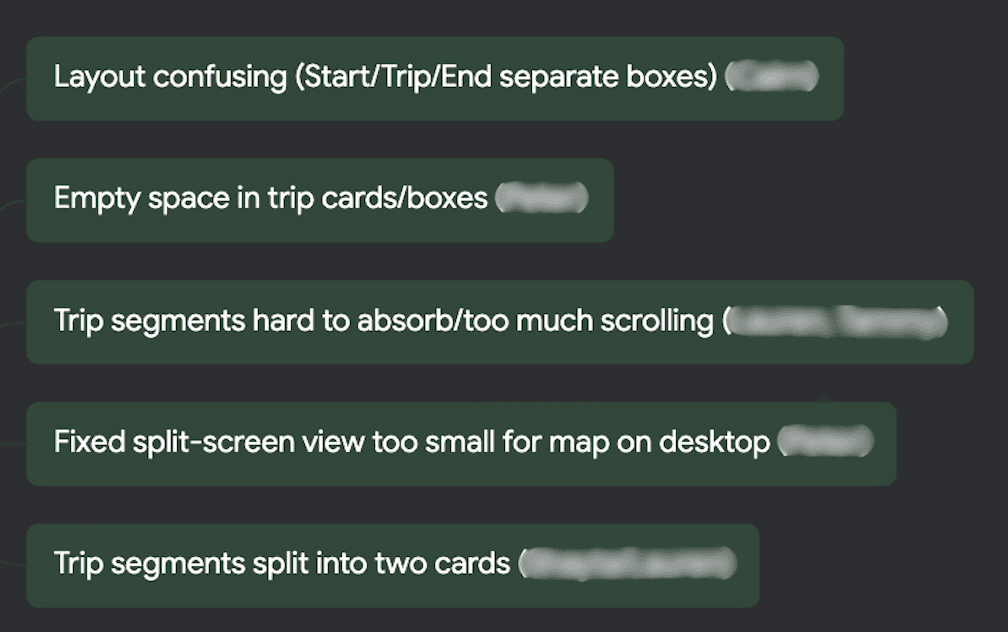
The Stakeholder Challenge
Product leadership also pushed back hard on this solution, with the primary reason being the experience still not simple enough, and the chunking of trips still being confusing. Additionally, since data density is a competitive advantage in the B2B fleet industry, the stakeholders mentioned: "We need the intuitive storytelling of the new timeline, but we cannot sacrifice the data density - we need to fit more trips in the vertical space to avoid excessive scrolling."
Problem Breakdown
All the problems identified could be broken down into these pieces from the prototype:
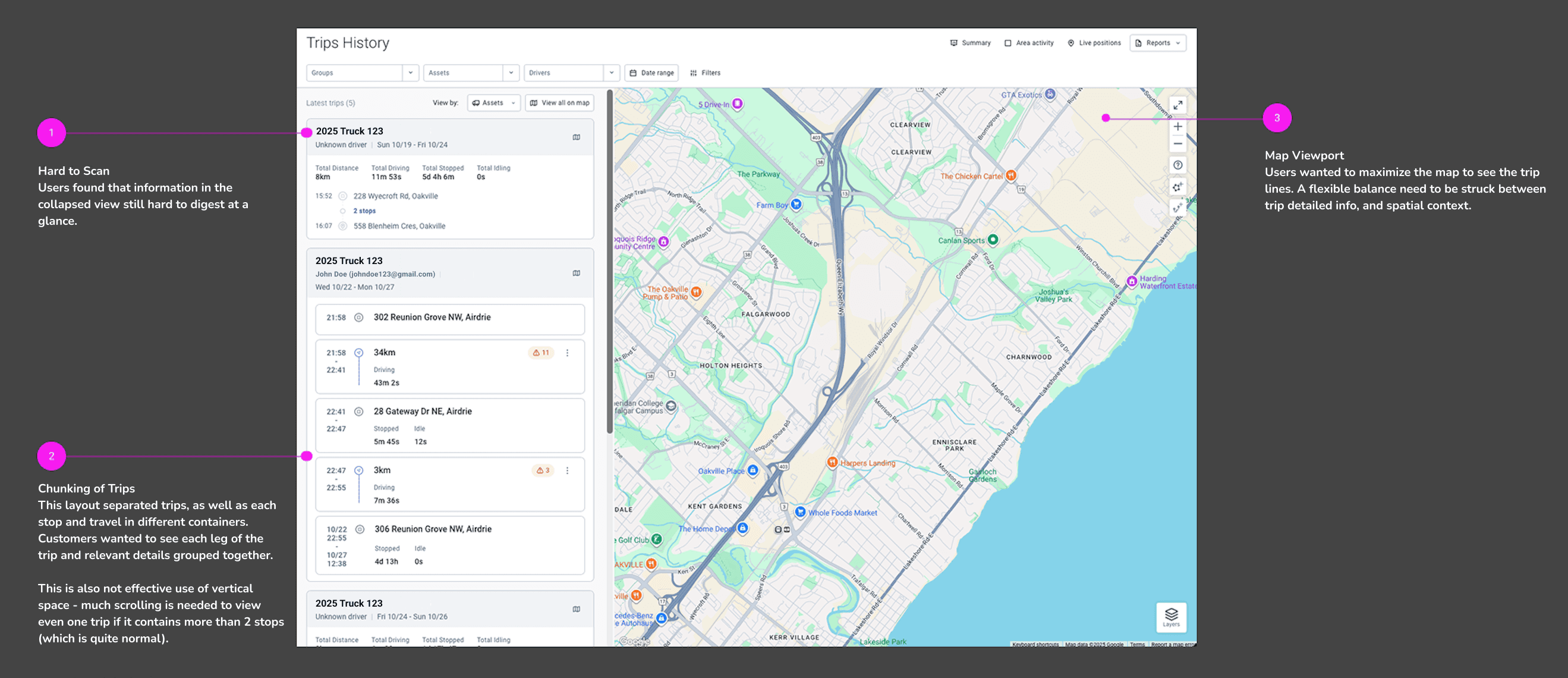
Design Decisions
So how did I tackle the new problems and keep making improvements?
To keep raising the bar, I needed to find a way to merge the chronological clarity of the trip cards with the high data density of a traditional data table. Instead of applying band-aid fixes, I took a step back to restructure the underlying information architecture. Based on all the feedback received, I mapped out a user journey for the current experience, so that the pain points and opportunity of improvements became clear:
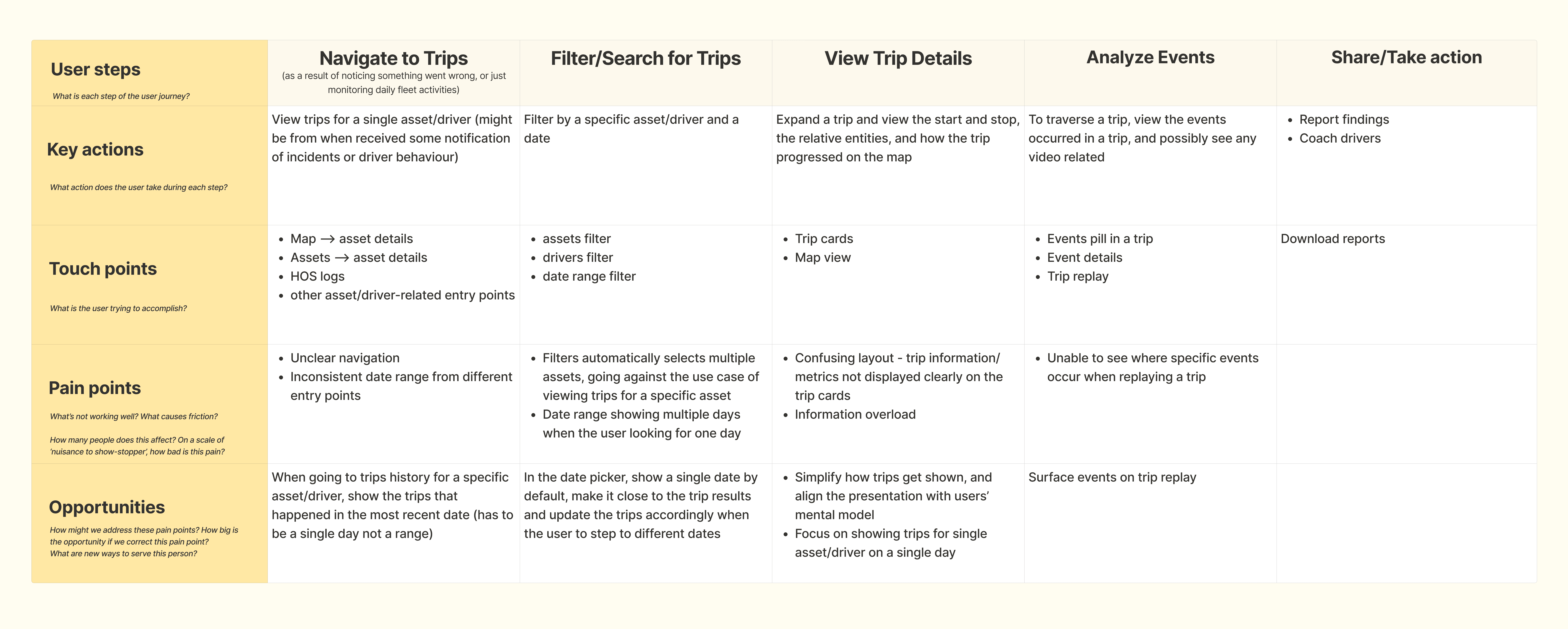
The Trip Card story
The Trip Card is the heart of usability, since having a Trip Card that's easy to read and understand will underpin the overall usability of the entire experience. Hence, our goal was that users must be able to quickly read and see the information they need, and have access to more details or actions as needed.
To address the top usability pains, I worked on multiple iterations of improvements based on user interviews, feedback survey and testing.
From the first iteration:
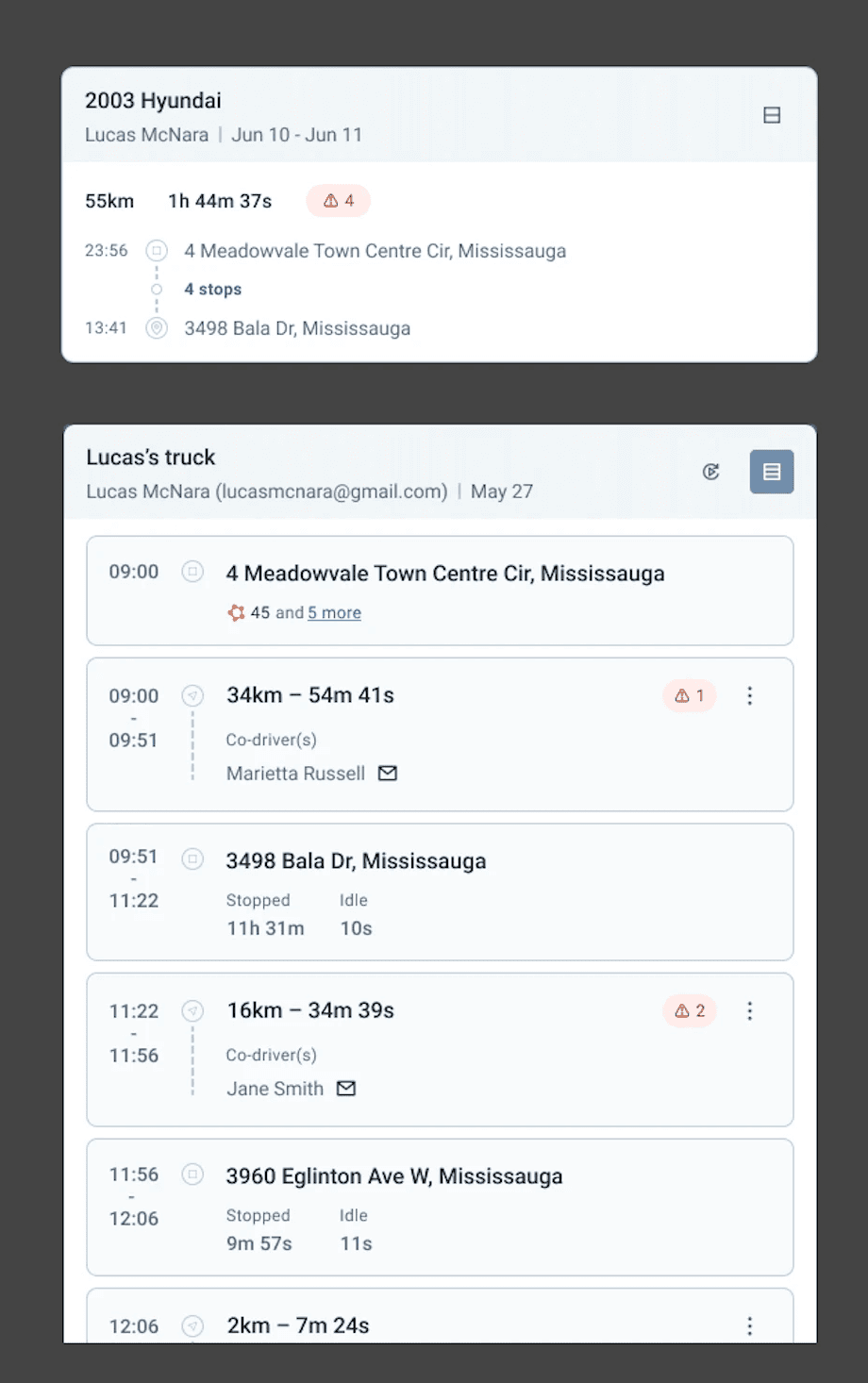
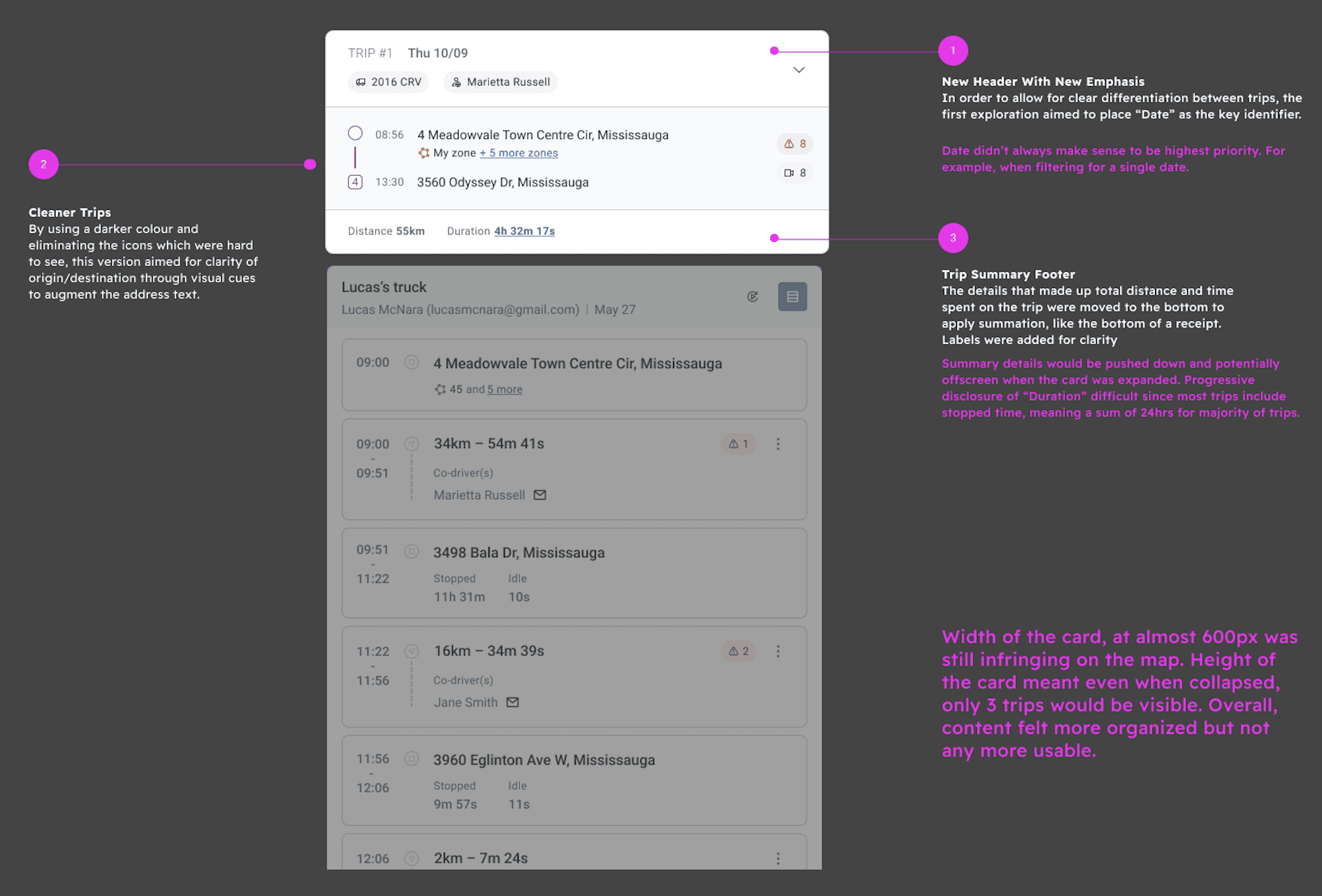
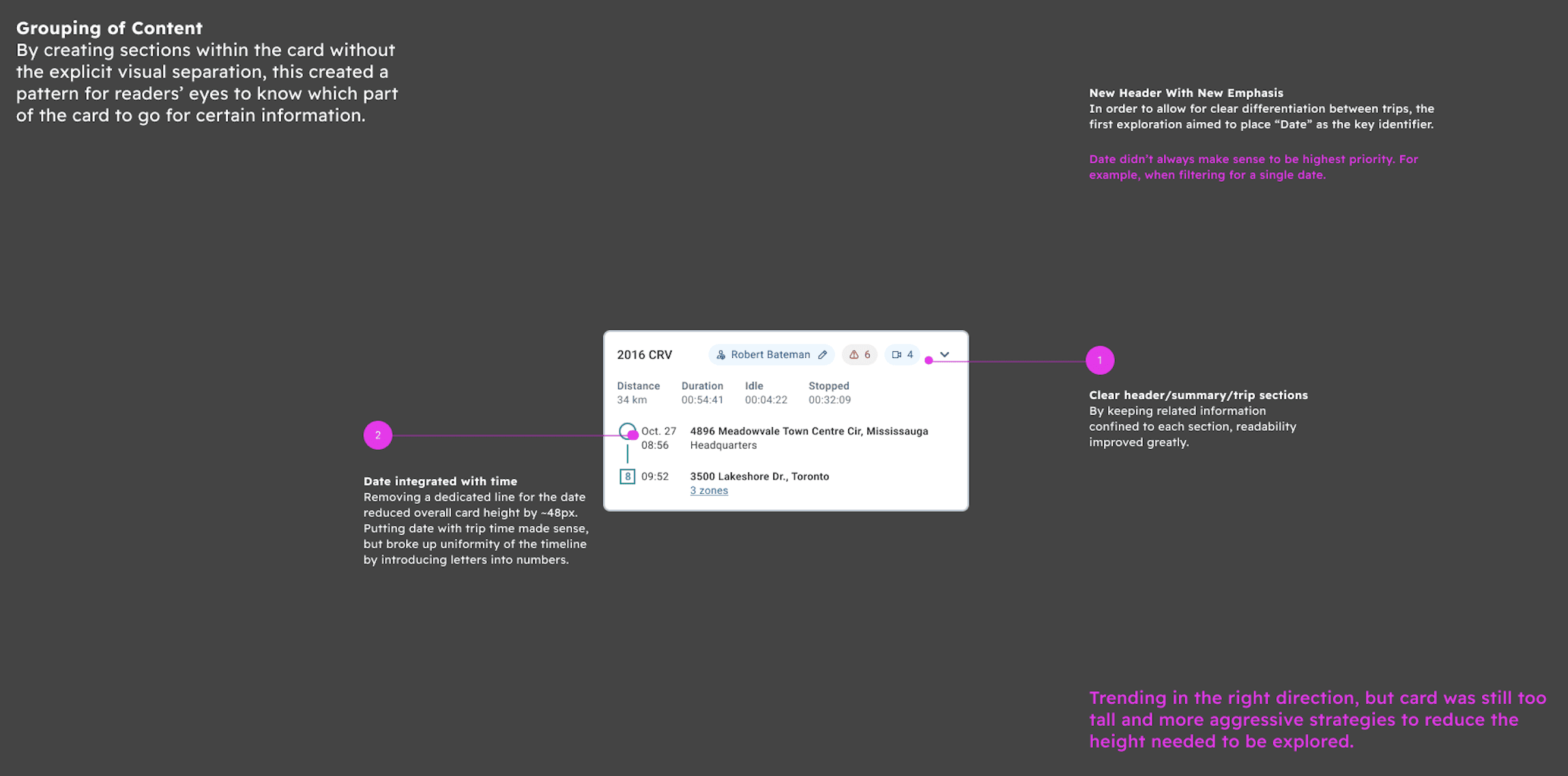
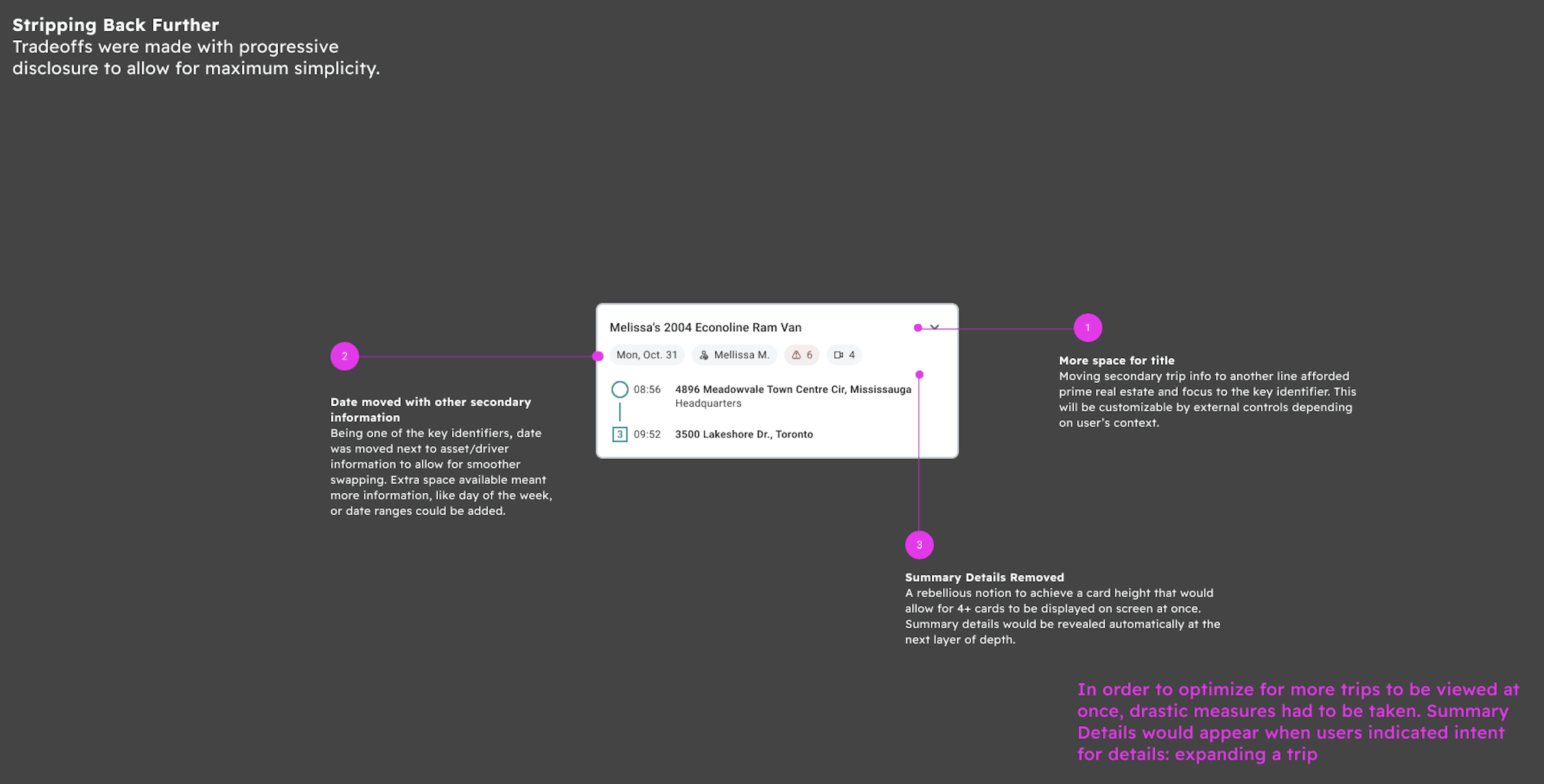
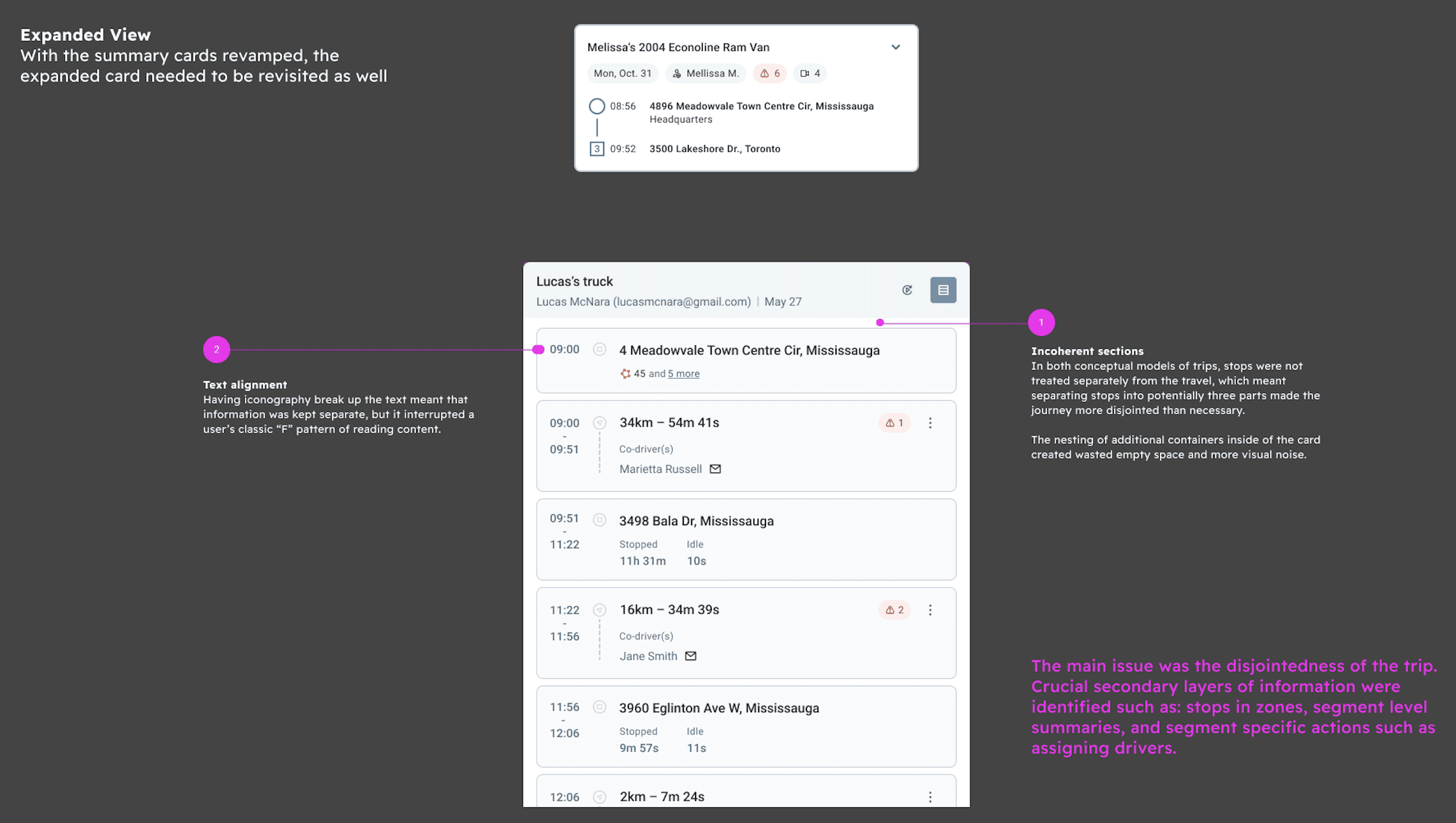
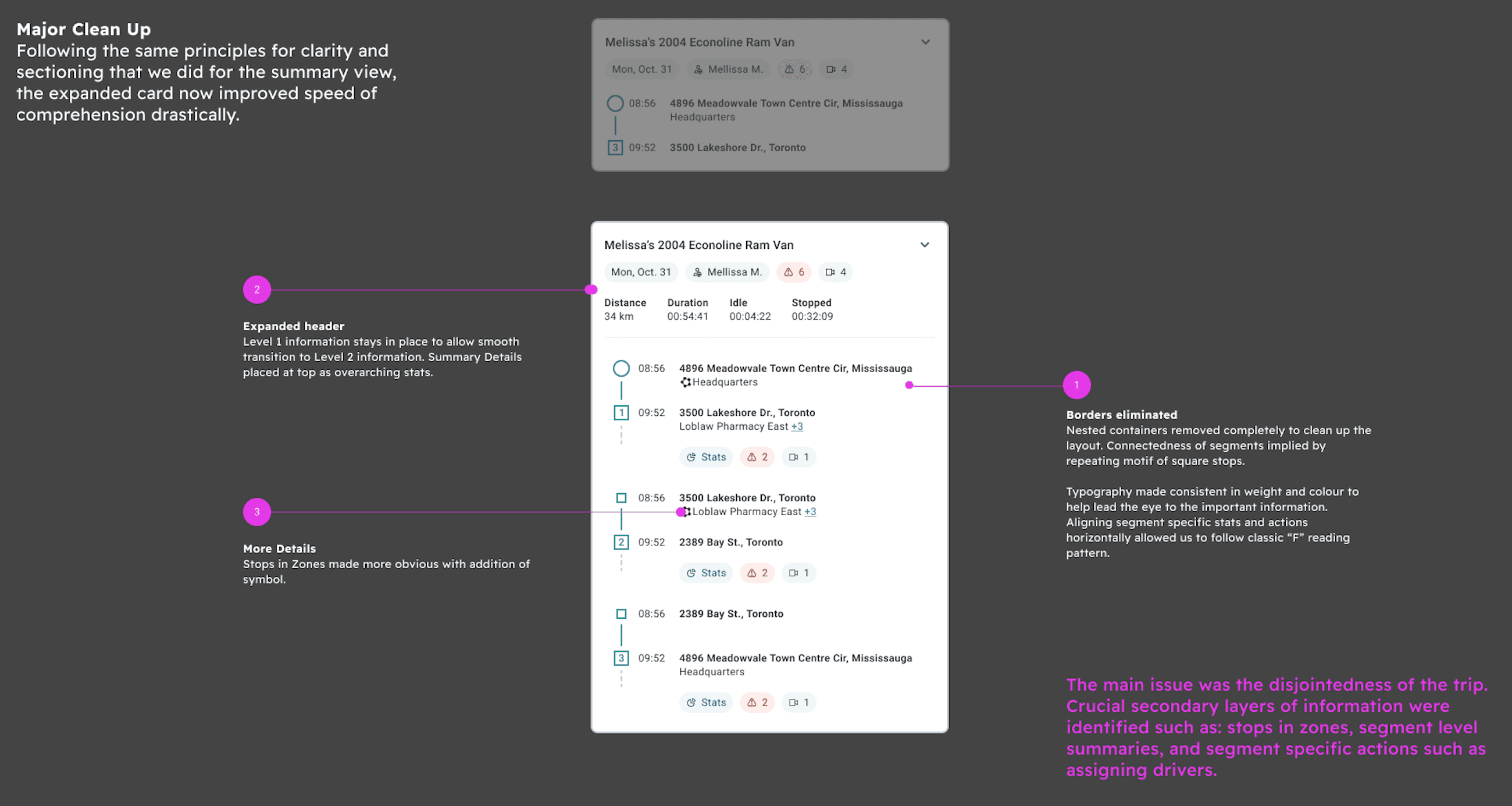
With a successful MVP of the card, we would be able to observe real user behaviors to see what parts are interacted with the most, so to manage potential risk, I validated the updated prototype with both internal teams and customers to establish a benchmark.
Specifically, I conducted design reviews and a collaborative UX scorecarding session with the internal teams, and usability testing with customers.
Final Delivery
After a couple rounds of validations, I finalized the design to prepare it for launching into Beta and having customers interact with the real product.

Product Impact
By overcoming significant organizational resistance, I successfully drove this complex feature into its Beta launch in Q1 2026. Partnering closely with the engineering team during the UAT phase, we ensured 100% high-quality front-end execution of complex interactions.
After launching, the Beta has received overwhelmingly positive feedback from customers:
"The new Beta works efficiently, way better than the old system."
— Fleet Manager (Beta Customer)
Thank you for reading!