Incident Management Workspace
Empowering fleet managers with secure, scalable, and data-driven incident investigations.

Overview
In this project, I led the design for a new feature that allows fleet managers and safety officers to easily and privately investigate incidents involving their vehicles, focusing on enhancing our existing activity search tool, as well as creating a case management system for saving the search and adding investigation details.
Role
Lead Product Designer
Timeline
Q1 2025 - Q1 2026
Team
PM, Engineers, Product Designer (me)
Context
In fleet management and public services (such as municipalities and public works agencies), vehicle incidents or public complaints are inevitable. Facing potential lawsuits, liability disputes, and public accountability, fleet managers and safety officers need to quickly and accurately reconstruct the truth of an incident to protect drivers and control risks.
What's not working today?
Why do we need to build a new dedicated investigation tool? One of the main reasons is that the current process is inefficient, doesn’t scale to handle larger fleets, unreliable and lacks the necessary privacy controls.
"Every time we investigate an incident, we’re stuck spending hours piecing together vehicle activity, and even then, we can’t confidently use your activity results to defend our drivers."
— Safety Officer (DOT customer)
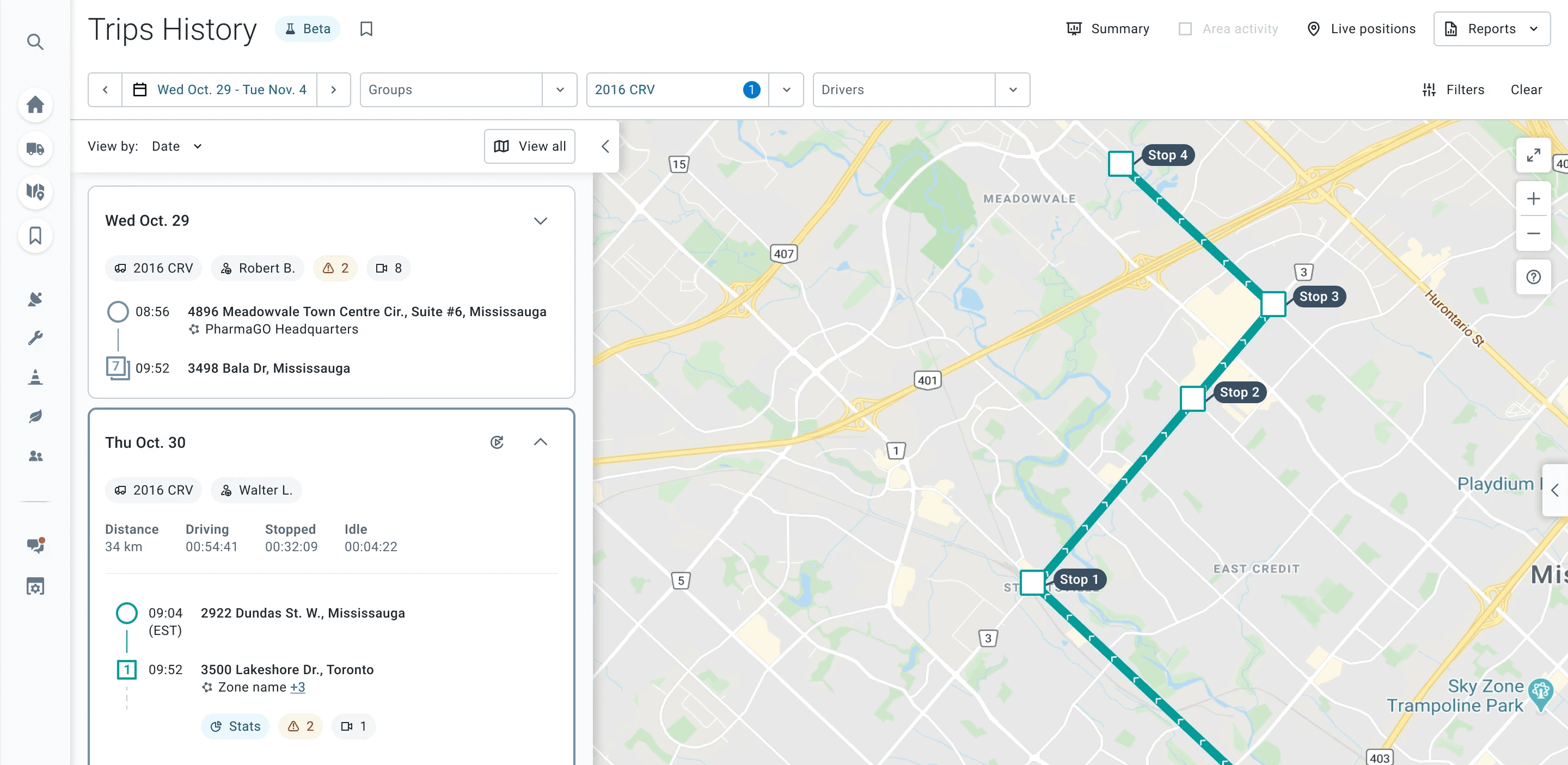
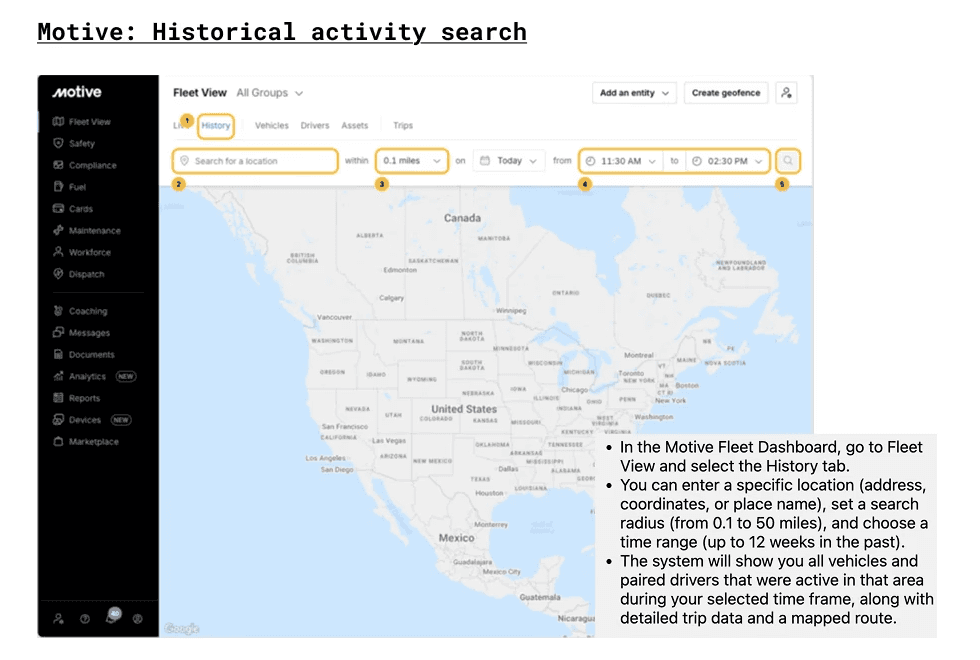
Specifically, there're significant gaps with our current vehicle activity search tool, since it was built for general fleet visibility, not incident investigation:
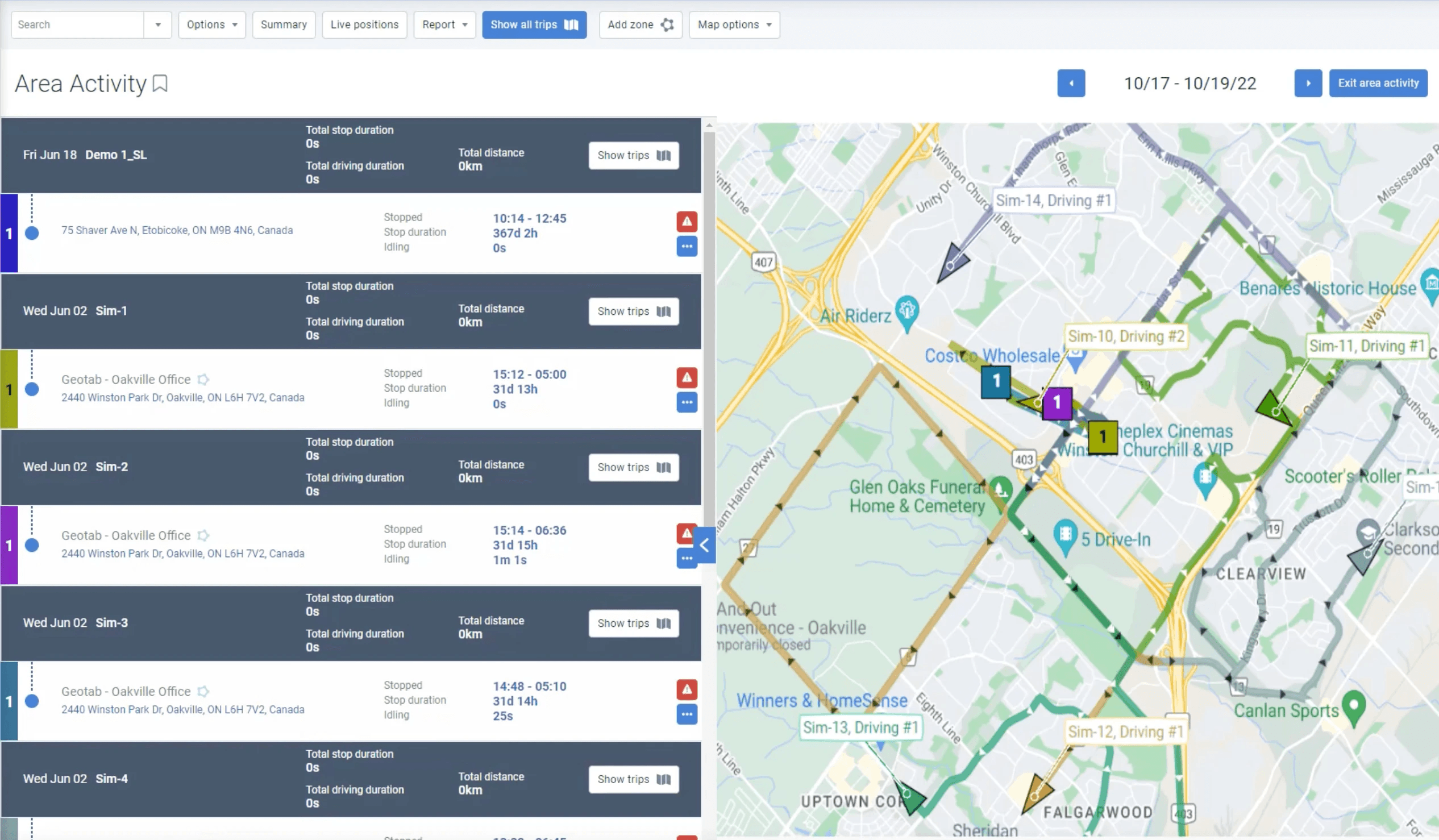
Existing tool of viewing vehicle activities in a defined area.
The tool itself also has scalability and reliability problems, as the system takes the whole map viewport as the search area, causing the system to load and respond slowly, and users won't be able to narrow down their search efficiently, resulting in a poor user experience.
Without a proper investigation tool, agencies had to build their own workarounds, which are all manual efforts:
Gathering details from public members that report an incident;
Reviewing individual driver paper records;
Email and phone conversations between teams involved in investigations;
Extracting data, mostly via screenshots and manually created spreadsheet files;
Sharing final reports by email.
Why the problem matters?
For safety officers and fleet managers, those manual processes are time-consuming, prone to errors, and often lack the necessary level of detail for thorough investigations.
For legal teams, a case file assembled from screenshots and emails doesn't hold up. Without an auditable, structured record, organizations struggle to defend drivers against wrongful claims — even when the data would exonerate them.
If we don't solve this, we risk losing enterprise accounts in the public sector to competitors who offer purpose-built investigation tools, and we leave our most high-stakes users without the capability their jobs actually require.
My Design Process
At a high level, my process consists of:
Research - Framing the Opportunity - Design - Validation & Collect Feedback
Competitive Analysis & Benchmarking
Before thinking about our solutions, I needed to understand what approaches existed in the industry, how they were used across different product types, and what trade-offs each carried, so I conducted a broad competitive benchmarking analysis, collecting examples from our two main competitors.
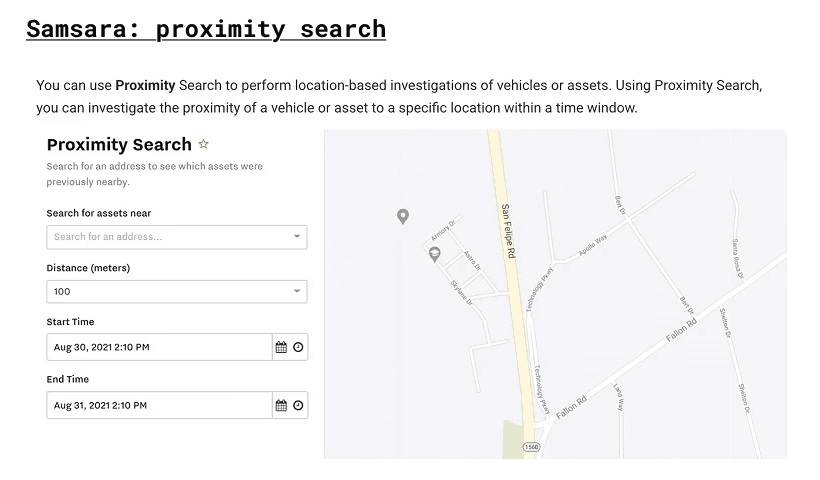
Both competitors offer a more comprehensive and powerful activity search tool, specifically, being able to narrow down the search area more efficiently and accurately.
Insights: The Core Jobs To Be Done (JTBD)
From the current problem and gaps, I turned the frictions into 3 core JTBDs - the actual outcomes users were using a tool to deliver:
1
Reconstruct what happened
"When a complaint is reported, I want to quickly understand what happened at a specific time and place, so I can validate the claim without manually piecing together data from multiple sources."
2
Build a defensible case
"When an incident has legal or operational impact, I want to organize relevant data into a clear and structured narrative, so I can confidently explain and defend what happened."
3
Share information securely
"When handling sensitive investigations, I want to control who can access and view specific information, so I can collaborate with stakeholders while maintaining privacy and compliance."
At its core, users are not just retrieving data—they are building a defensible story.
Opportunity Framing
With the JTBDs defined, the solution space was opened up, before narrowing into design:
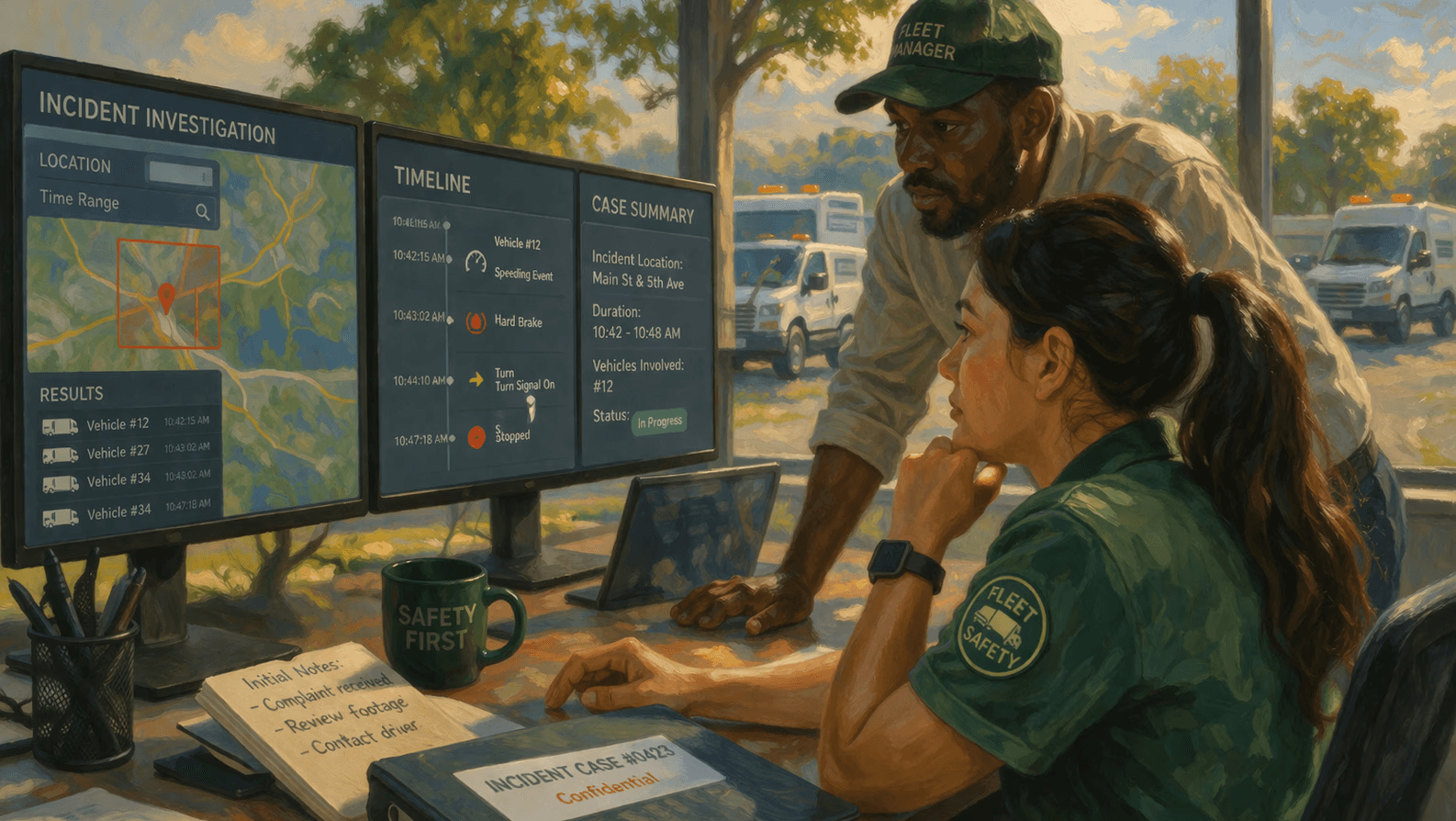
These HMWs became the foundation for exploring a new and more comprehensive solution.
Design Decisions
From "exploring activities" to "formalizing into a case"
The flow starts from the map page, where users click on “Area Activity” and define an area by drawing a rectangle. Once the area is formed, they can view relevant vehicle activities within that boundary on the activity details page. From there, users have the option to save this activity as an investigation. They then enter key information such as the investigation name, date range, visibility (public vs. private), and a brief description. Once saved, the investigation is stored in the case management system for future access and review.
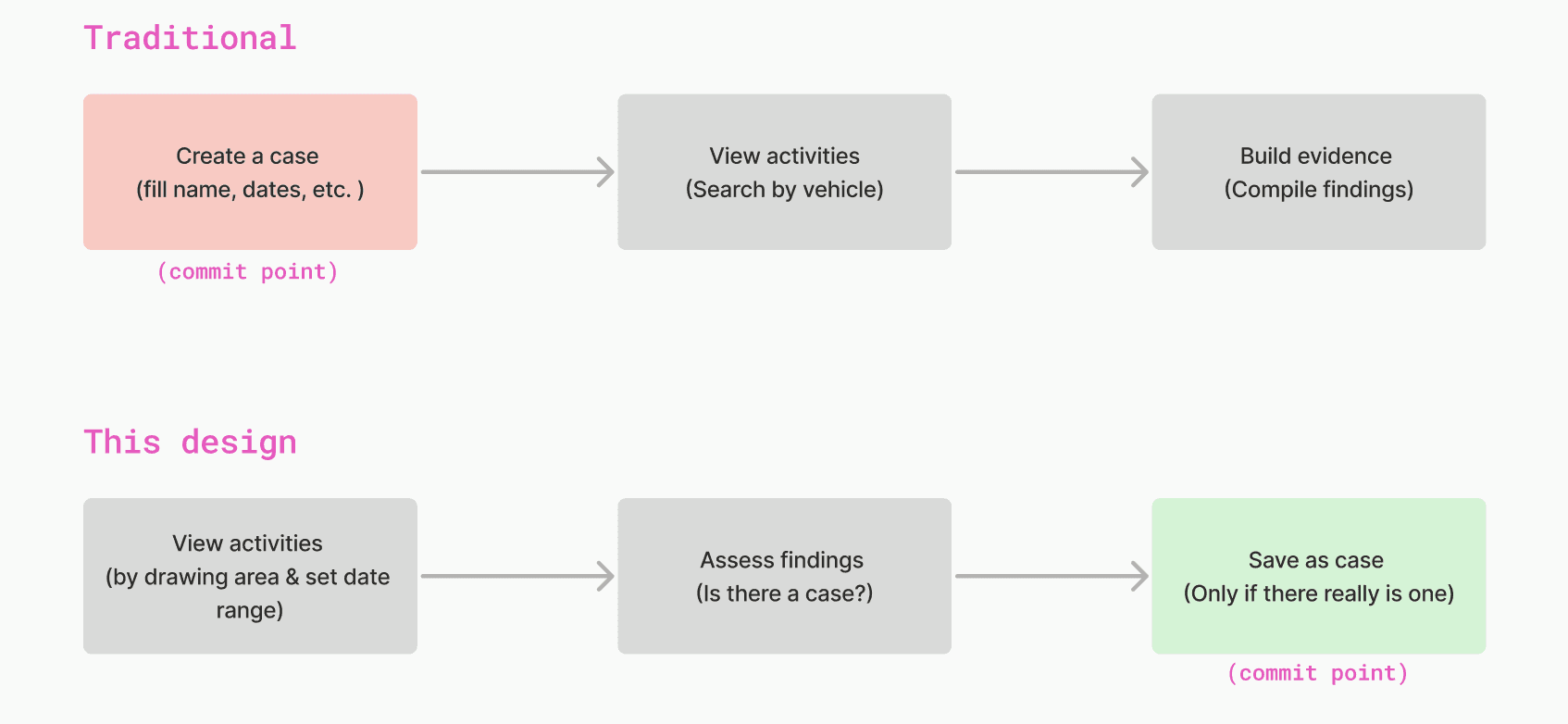
Moving the commit point from step 1 to step 3 removes the friction of starting a formal case before knowing if there's anything worth investigating.
While most tools require users to fill out a form before the system queries for any data, I intentionally reversed that flow to lower the barrier to getting started. Users can first explore activity and quickly understand what’s happening, then decide whether it’s worth formalizing into an investigation. This directly supports the 1st JTBD #1 - reconstruct what happened and and validate fast. This design decision also shifted the experience from a one-off activity lookup to a persistent investigation model, where users can save, revisit, and build on their findings over time.
Two entry points for two distinct mental models
The first design decision naturally led to supporting two different entry points, with the intention of matching different user intents - reactive investigations starting from the map, and proactive case creation from the investigation system.
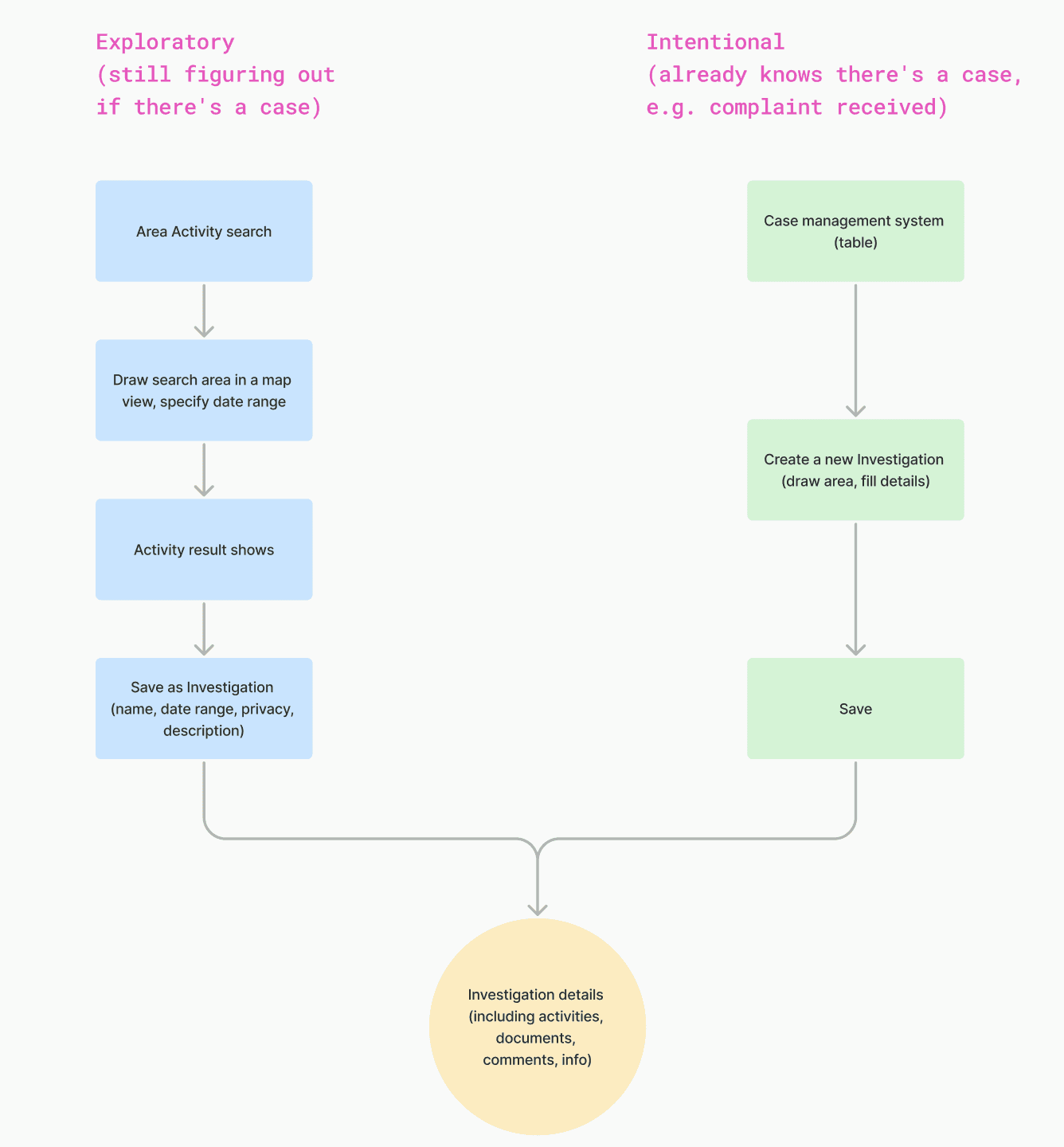
Entry from the map page to perform an Area Activity search (map → draw area → show activity → save as investigation) follows an exploration-driven path: users are not yet sure if there’s an issue, so they begin by looking at the data and only formalize an investigation if something stands out.
Entry from the case management table (Investigations → Create investigation) follows an intent-driven path: users already know there’s an issue and come in with the goal of creating and managing a case directly.
A single entry point would simplify the UI, but would force users into a rigid workflow that doesn’t reflect real-world usage.
Mapping Out the End-to-end Workflow
With the above design direction in mind, I translated my decisions into an end-to-end experience, from receiving a complaint to resolving the case. This would support with structured solution validation with fleet managers and safety officers from public works agencies and state DOTs, after the design solutions are finalized.

This shifted the conversation from individual features to validating the entire investigation lifecycle. This workflow also helped identify gaps and refine the final design.
Constraints & Challenges
Many of the key design decisions in this project were shaped through close collaboration with engineering. Rather than treating constraints as blockers, I approached them as opportunities to prioritize what matters most for the user while ensuring we could deliver on time.
To navigate tradeoffs, I focused on three questions:
What is the core user value we must preserve?
What can be simplified for MVP without breaking the mental model?
What can be iterated on later?
Constraint 1: Polygon → Rectangle
My initial high-fidelity design allowed users to draw a custom polygon (similar to the interaction below), since this would offer the freedom to trace complex intersections or oddly shaped operational zones.

However, engineering pointed out that this would significantly increase implementation complexity and impact our delivery timeline. To move forward, I reframed the question from “what is the most flexible interaction” to “what is sufficient for users to complete their task.”, and aligned with my PM and Engineers on using rectangles only (by drawing the diagonal) as an MVP solution, since it still allows users to scope investigations spatially while being much simpler to implement.
This allowed us to ship a usable solution quickly, while leaving room to evolve toward more flexible shapes in the future.
Constraint 2: Circle → Square
Another tradeoff came up when designing the address-based area selection. My initial design was to generate a circular area around the searched address, as it more naturally reflects how users think about proximity.
However, engineering pointed out that our backend already supported rectangular queries, and introducing circular geometry would require additional effort that wasn’t feasible for MVP. Instead of pushing back on the ideal solution, I worked with the team to evaluate the impact on user understanding. While a square is less aligned with users’ mental model, we determined that it would still be good enough for initial investigations, especially when paired with clear visual feedback on the map.
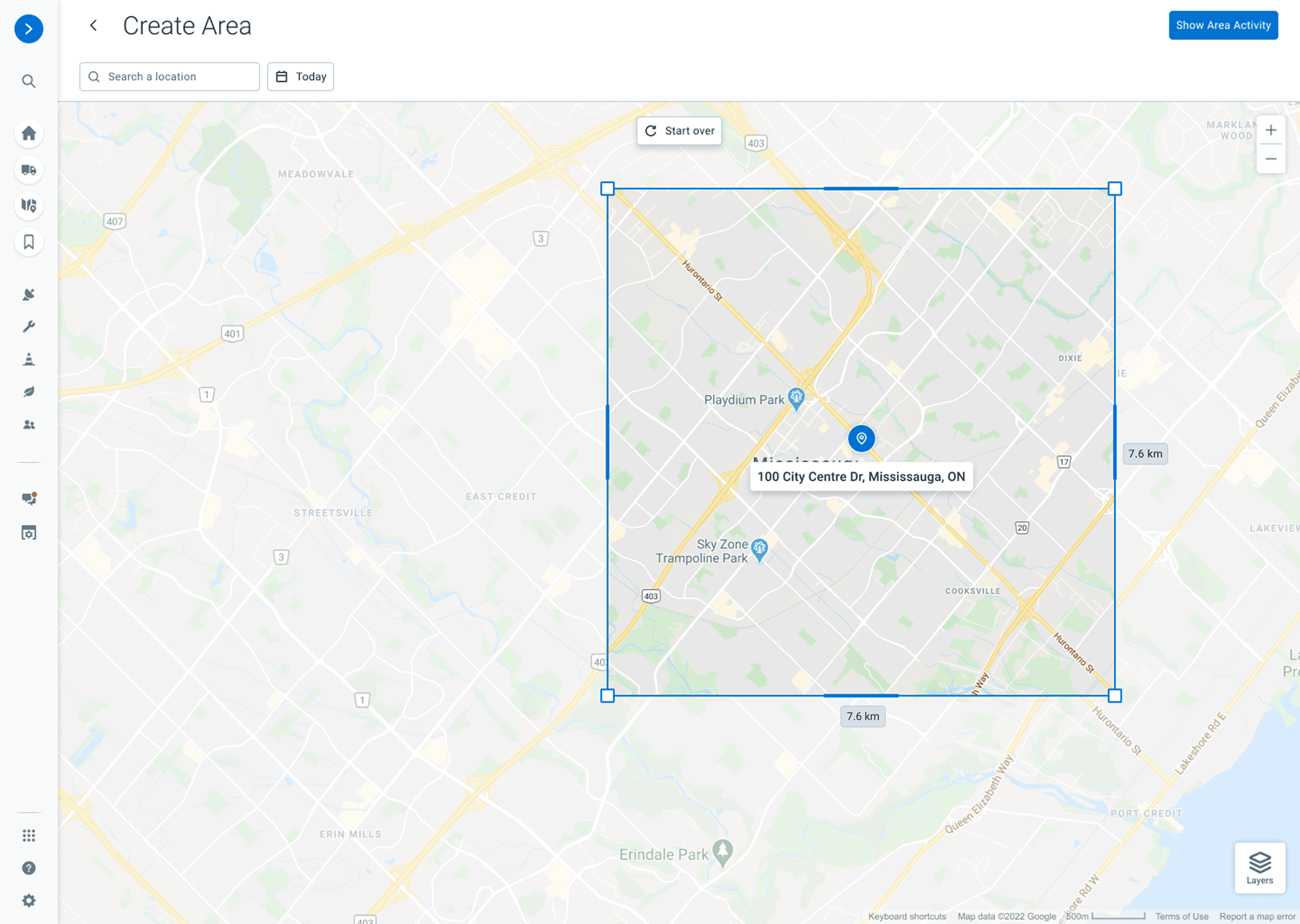
As the result, we decided to prioritize speed-to-market over perfect visual metaphors, while identifying this as an opportunity for future refinement.
Final Delivery
After a couple rounds of validations with our customers, I finalized the Minimum Viable Product (MVP) to prepare it for launching into Beta and real-world customer feedback.
Enhanced Area Activity
The ability to draw and refine the search area:
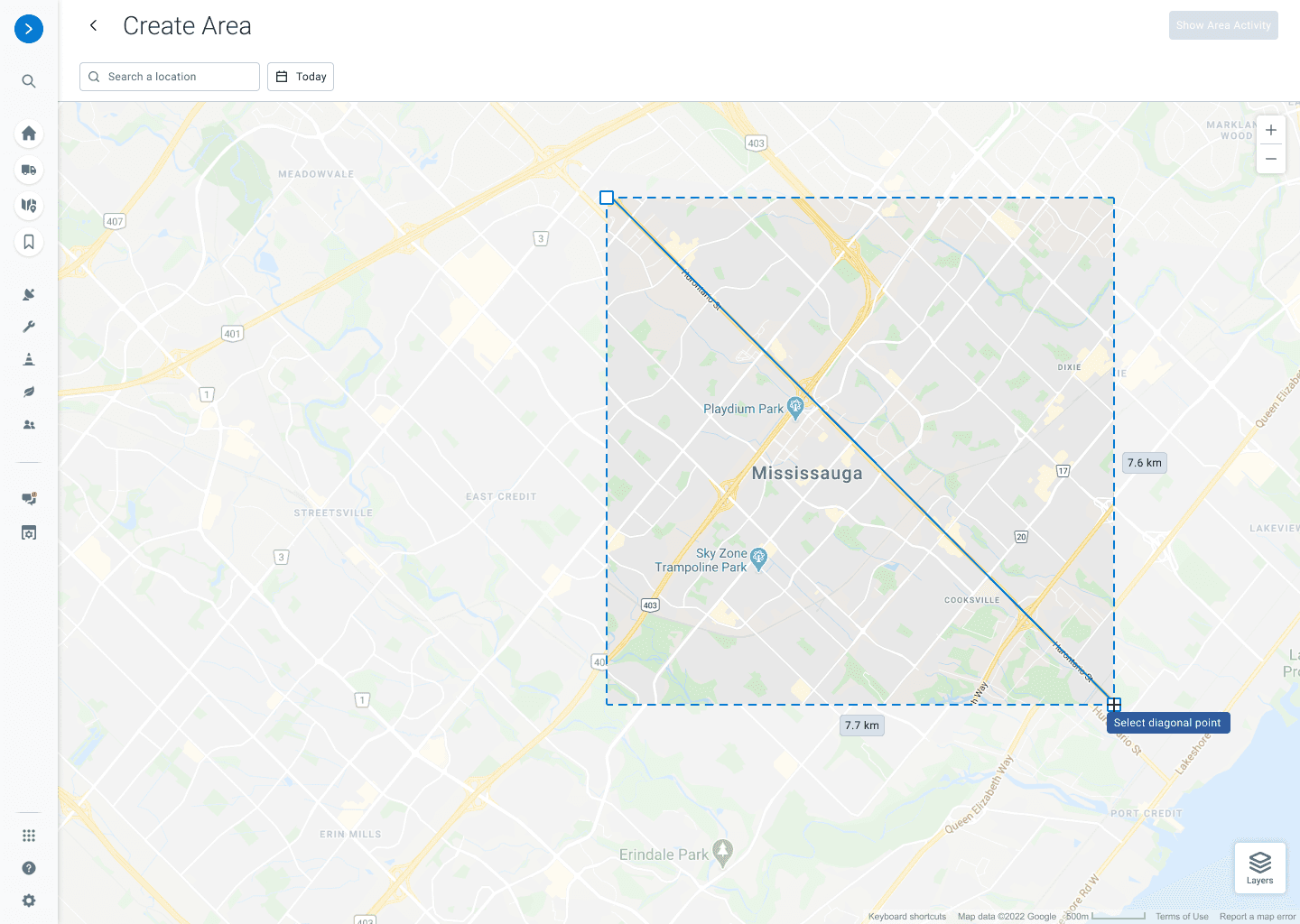
Since users are now able to draw and specify an area, they're also able to view clearly when and where a vehicle entered and exited the area.
Case Management System
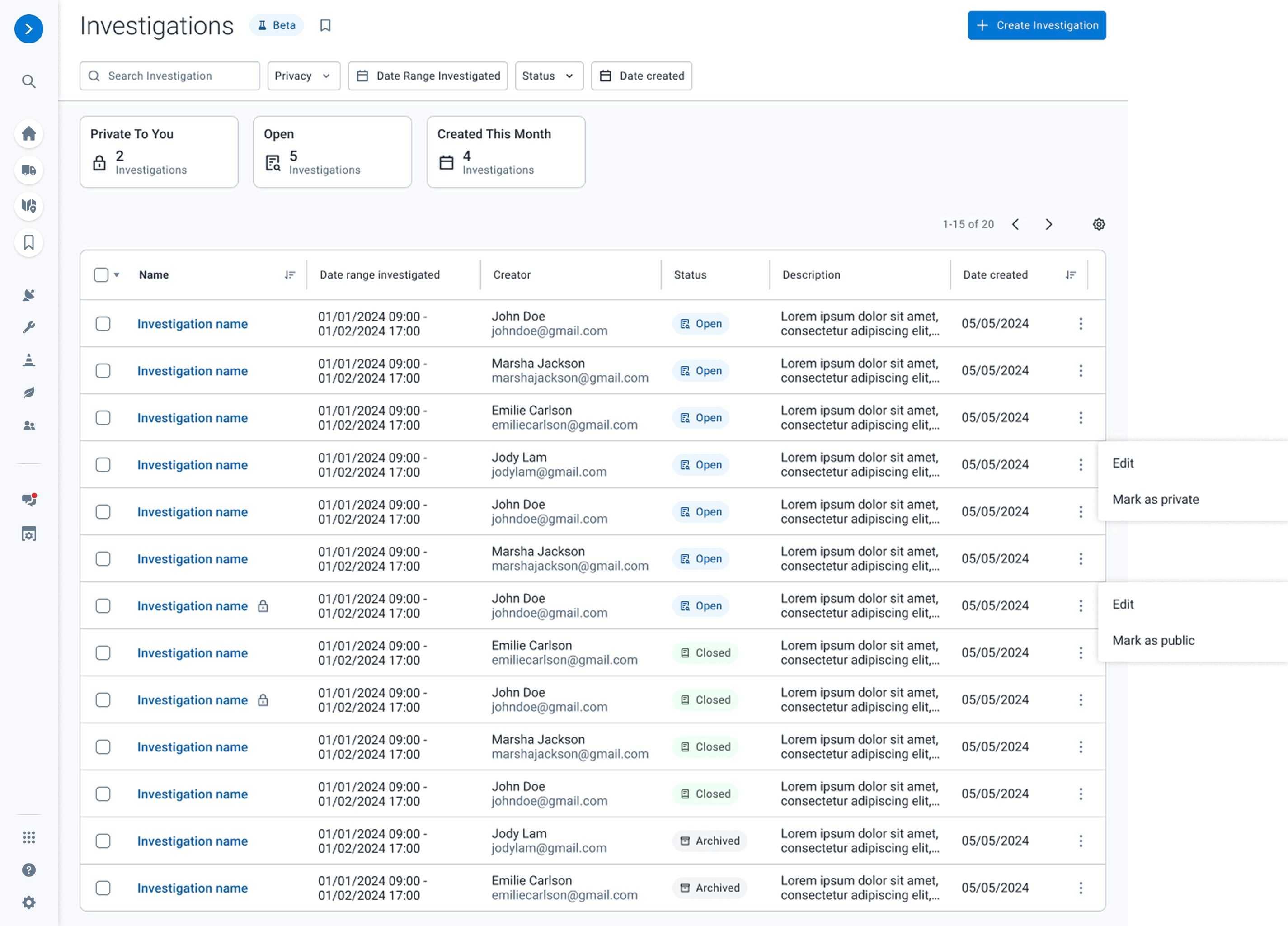
This Case Management System provides historical record of previous investigations, allowing safety officers and fleet managers to refer back to a case easily and anytime they want. The privacy control also helps classifying who has access to any ongoing investigations and the resulting data.
Investigation Details - Activities
The Activities tab in the details page provides vehicle trips that were found in the area, allowing users to dive into one specific trip and view all the details including when and where it enters/exits the area, what the trip progress was, and what events were occurred.
Investigation Details - Documents & Comments

Having a dedicated documents section turns fragmented data and evidence to a neat and secure digital folder.
Product Impact
We launched the feature behind Beta in Q1 2026 to gather early feedback from DOT customers. To validate the solution, I partnered directly with my PM to run customer interviews and usability sessions, leveraging our established bi-weekly syncs with key DOT customers. Gathering this firsthand feedback allowed me to confirm strong validation of the core workflow, particularly around faster investigation setup and improved clarity in understanding vehicle activities.
"The ability to instantly bundle these findings into a secure, private case file is a game-changer for our legal compliance."
— Fleet Safety Director (Beta DOT Customers)
Learnings & Future Work
What went well: Bridging the gap between User Needs and Technical Feasibility
By initiating deep, early-stage collaboration with the engineering team, we successfully navigated multiple design trade-offs. This pragmatic approach ensured we addressed the core user pain points without missing our launch window. It reinforced my belief that in a high-stakes B2B environment, a functional, timely solution is far more valuable than a "perfect" design that never ships.
What could be better: Early stress-testing with large-scale data sets
While our Beta feedback was overwhelmingly positive, testing with large scale fleets revealed that data retrieval speeds could still be further optimized. In the future, I would advocate for using massive, real-world data sets during the prototyping phase rather than just "happy path" samples. This would have allowed us to bake more advanced pre-filtering logic into the initial MVP architecture.
What I'd do differently: Evangelizing the "incident management" vision sooner
In the beginning, we were heavily focused on the core interactions such as "defining area on map". If I had introduced the ideal state Journey Map earlier to stakeholders to highlight the entire journey from "search" to "creating a case", we might have secured more resources earlier in the cycle to develop advanced encryption and collaboration features alongside the core search tool.
In next phases, we will be prioritizing having the feature of using customized polygon to refine the searches (as customers also requested during validations).
Thank you for reading!